No answers match that search. Try a shorter word, or email hello@getfeedproof.com.
Getting started
Install, let the first score finish, run your first AI check.
What does FeedProof do?
AI assistants now recommend products and stores. FeedProof does three things about that:
- Visibility — asks AI models with live web search the questions your shoppers ask, and counts how often your store is named.
- Fix — scores every product against 19 attributes AI relies on, then drafts the missing ones for you to approve. Every write can be reverted.
- Proof — holds a comparable set of products back unchanged, so you can compare the fixed set with the held-back set instead of guessing.
What happens right after I install?
FeedProof scores your catalog straight away; it usually takes under a minute. The Visibility page shows a spinner until it's done, then your readiness score and the three changes worth the most points.
Nothing is written to your store until you approve a fix.
How do I run my first AI check?
On Visibility, press Check how often AI names you (later, Check again). FeedProof asks the questions in your battery across the AI models it has access to and shows how many answers named your store. A check takes a few minutes; you can leave the page while it runs.
Visibility
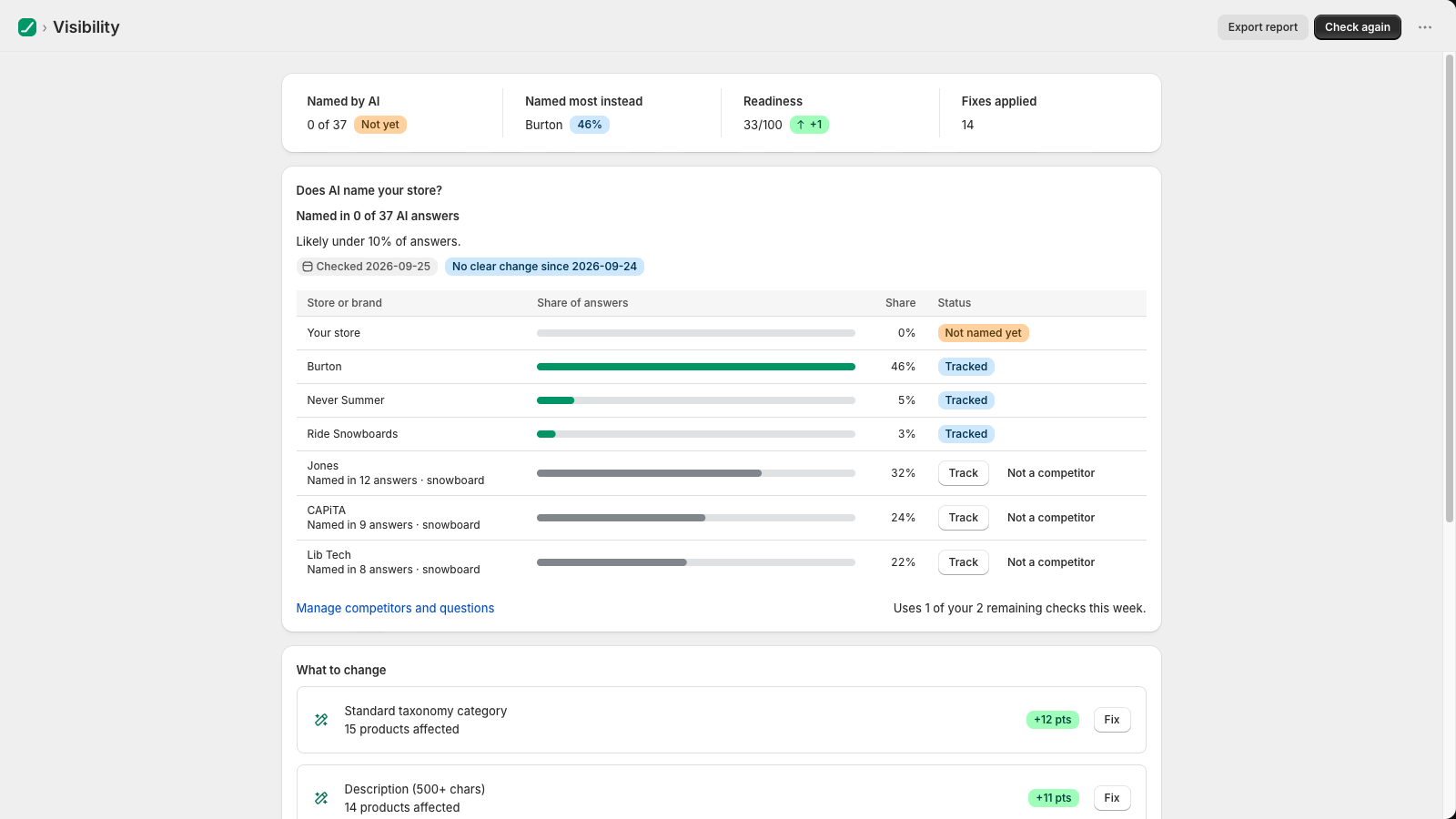
How often AI names your store, and who it names instead.
What does "Named in 0 of 37 AI answers" mean?
FeedProof asked AI models 37 shopper questions (for example "best snowboard for beginners") and your store was named in none of the answers. It is a count of real answers, not an estimate of search traffic.
Why does it say "Likely under 10%" instead of 0%?
A few dozen answers is a sample. "Likely under 10%" means that if you asked many more questions, your true rate would very probably be below 10%. As you run more checks the range narrows. (It's a 95% Wilson interval, for anyone who wants the method.)
What does "No clear change" mean?
FeedProof only calls a change up or down when the likely ranges of two checks don't overlap. If they overlap, the difference could be noise, so it says "No clear change". This stops a single lucky or unlucky check from reading as progress or a drop.
Who are the brands AI "named instead"?
Brands and stores that appeared in the same answers. FeedProof suggests them from the answers it collects; press Track to compare against a brand at every check, or Not a competitor to stop seeing it. Marketplaces and platforms such as Amazon, eBay and Google are filtered out.
Why can't I run another check right now?
Each check costs real AI queries, so checks are limited per plan, with a short cooldown between runs. The button tells you when the next one is available. See Plans & limits.
Fix
Close the catalog gaps AI relies on. You approve every change, and every change can be reverted.
What is the readiness score?
Every product is scored 0–100 against 19 attributes AI assistants use to understand and recommend products: a standard category, a specific title, a full description, dimensions, materials, barcodes, images and more. Your store's score is the average. Bands:
| Score | Band |
|---|---|
| 0–49 | Invisible |
| 50–69 | At risk |
| 70–89 | Nearly there |
| 90–100 | Agentic-ready |
What do "+12 pts" and "AI draft, you approve" mean?
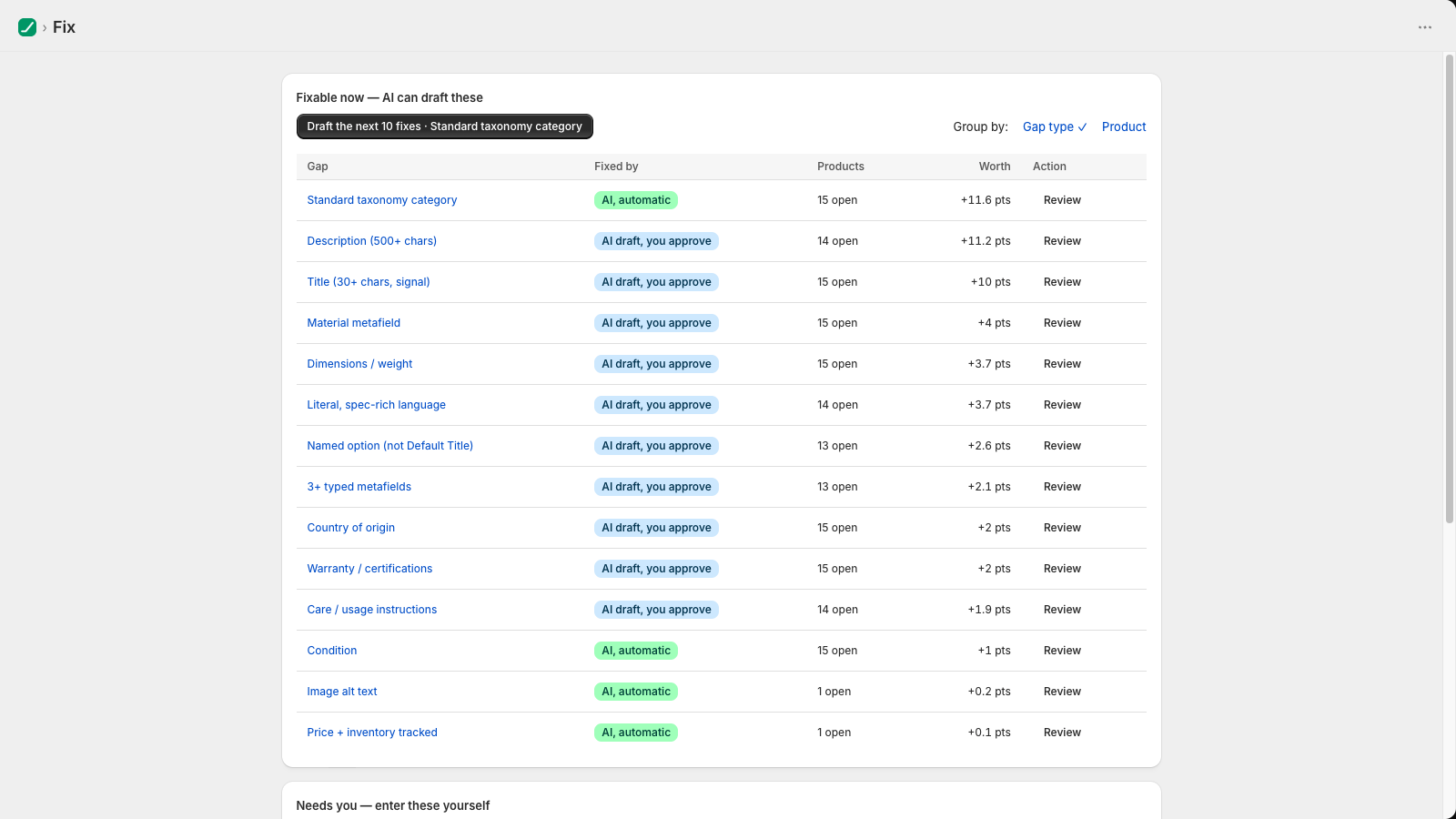
"+12 pts" is roughly how much your store score would rise if every product with that gap were fixed. The Fix list is sorted by it, so the top row is the best use of your time.
- AI, automatic — FeedProof can fill it in (for example a standard category).
- AI draft, you approve — FeedProof drafts it and you review the before/after first.
- You enter — only you know it (for example barcodes, which you can import from a file).
How do I apply fixes?
- On Fix, press Draft the next 10 fixes, or open a gap with Review.
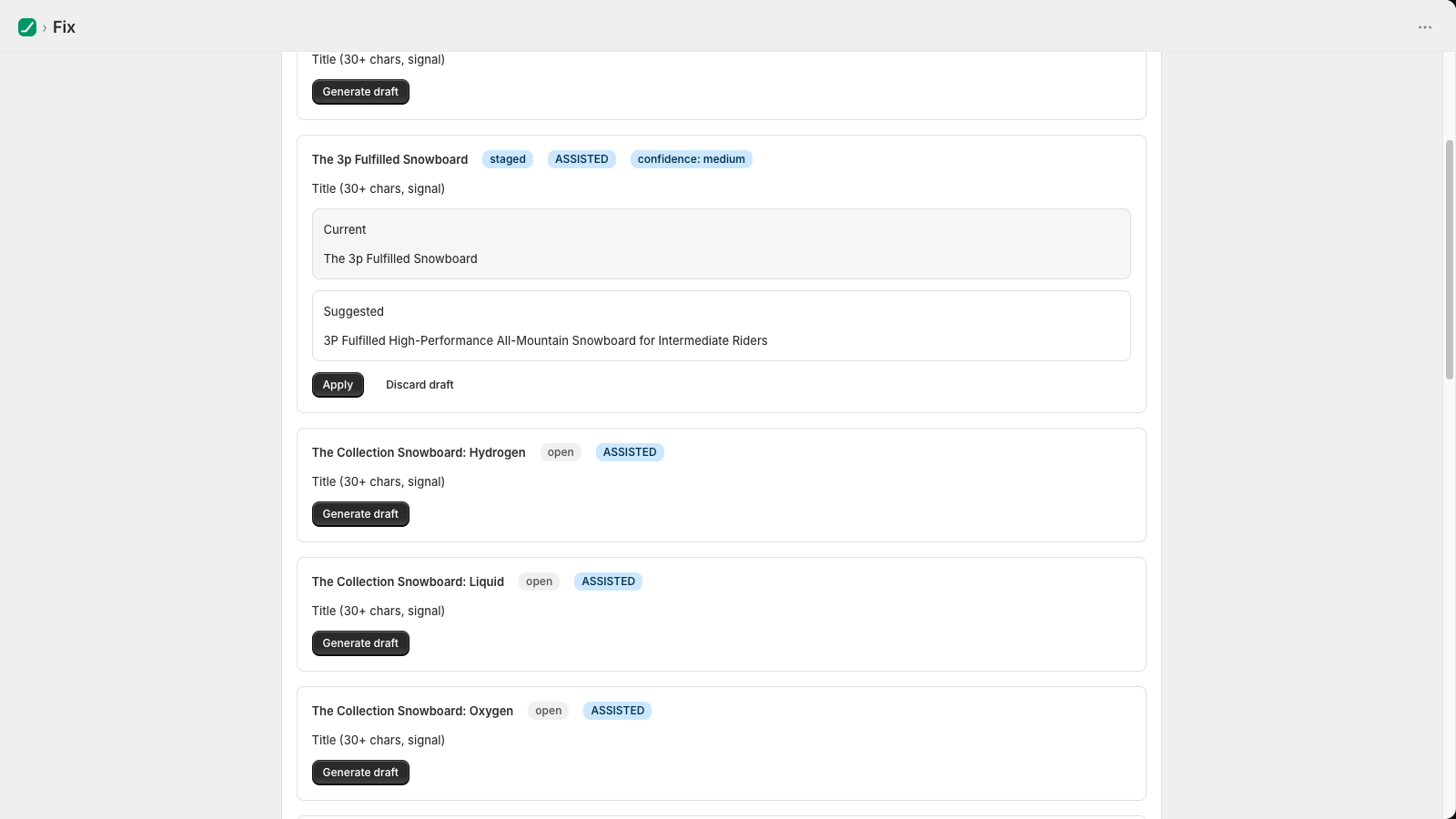
- Check each draft against the current value, then approve it.
- Press Apply approved to store. FeedProof asks you to confirm before it writes anything.
How do I undo a fix?
Open Fix → View history and press Revert on the change. FeedProof stores the value it replaced for every write, so reverting puts back exactly what was there.
Where do fixed values go in Shopify?
Into the product itself — title, description, standard product category — or into metafields in the feedproof namespace for attributes Shopify has no field for. Nothing is written to your theme.
Proof
Compare products you fixed with a set held back unchanged.
Why hold products back?
AI referrals are growing for every store, whatever you change. A plain before/after would mostly measure that growth. When your first fix lands, FeedProof keeps about 20% of comparable products unchanged for 28 days. Both sets see the same channel over the same period, so comparing them cancels most of the channel's own growth.
Why is Proof locked?
It needs two things: a group held back (set up automatically with your first fix) and enough AI-referred orders on both sets to compare. The Proof page shows which of the two is in place. AI-referred orders are recorded as they arrive; press Check for AI orders to pull in ones placed before you installed.
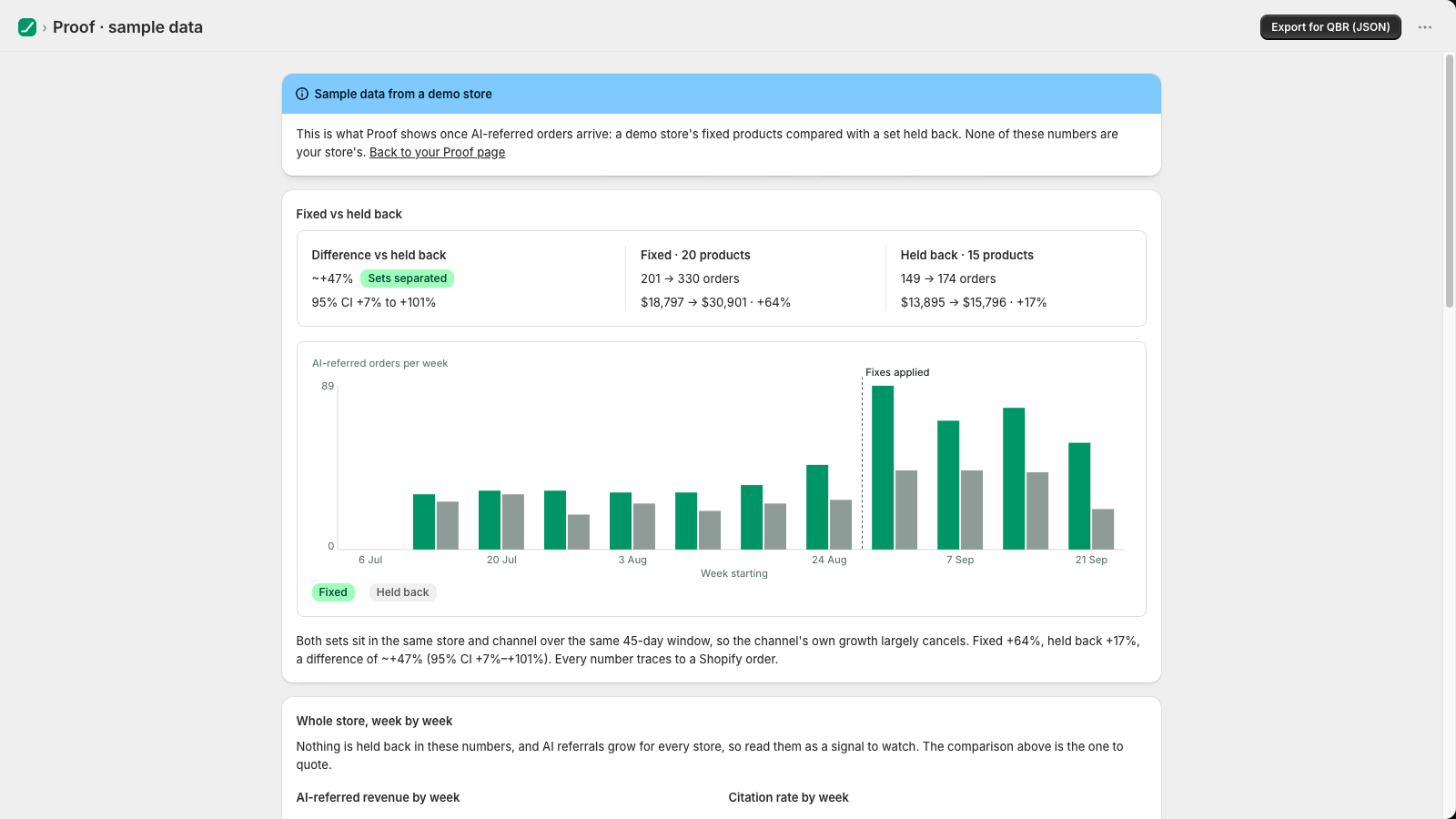
Want to see what it looks like first? Open Proof → See an example with sample data. It's a clearly labelled demo store.
How do I read "~+47%, likely +7% to +101%"?
Fixed products grew their AI-referred orders about 47 percentage points more than the held-back set. The range is where the true difference very probably sits (95% confidence). When the whole range is above zero, the two sets have separated. When it still includes zero, they haven't yet, and more orders will tighten it.
It's a comparison between two groups, not a measurement of what any single fix did.
Which AI sources count as referrals?
Orders whose landing page or referrer shows ChatGPT, Perplexity, Google AI (Gemini), Copilot or Shop's AI, plus tagged links from other assistants. FeedProof reads the order value and source only.
Plans & limits
Billed through Shopify. Paid plans have a 14-day free trial.
| Free | Grow | Scale | |
|---|---|---|---|
| Price | $0 | $29 / month | $79 / month |
| Catalog score | Yes | Yes | Yes |
| AI checks | 1 / month | 5 / week | 20 / week |
| Fixes applied | — | 500 / month | 5,000 / month |
| AI drafts | 25 / month | 1,000 / month | 10,000 / month |
| Citation spot-checks | — | 10 / week | 50 / week |
What happens when I reach a limit?
Nothing is charged by surprise and nothing is silently skipped. Approved fixes wait until the next month or an upgrade, and the Fix page tells you how many you have left once you're close.
How do I change or cancel my plan?
Use the Upgrade button on the Fix page, or in your Shopify admin go to Settings → Apps and sales channels → FeedProof. Billing, trials and cancellations are handled by Shopify on your normal invoice.
For agencies
Run FeedProof across client stores from the Agency Console.
What is the Agency Console?
A web app for agencies at feedproof.fly.dev/console. It lists every client store in your book with the same four numbers each merchant sees in their app: readiness, how often AI names them, the fixed-vs-held-back result and open levers. Each store has a client-ready Scorecard you can print or share by link.
How do I add a client store?
In the console, open Invites & stores and press Create invite code. Then either:
- send the code to the merchant, who installs FeedProof and enters it under Settings → Link an agency; or
- install FeedProof on the store yourself with collaborator access, then enter the store's domain and the code in the console.
What are "levers"?
Things that keep AI from naming a store that a catalog fix can't reach: review depth, price position against the brands AI names, and mentions on the third-party "best of" pages AI cites. Each is marked High, Medium or Low impact.
Can I put my own logo on the Scorecard?
Yes. Under Branding, add a logo link and accent colour. The Scorecard then shows your mark with "Powered by FeedProof"; managed partners can remove that line.
Your data
Product data and order totals. Never customer names, emails or addresses.
What does FeedProof read?
Your products (to score and fix them) and, for Proof, each order's value and whether it came from an AI source. It does not request access to customer names, email addresses, phone numbers or addresses.
What happens if I uninstall?
Everything FeedProof holds for your store is deleted within 48 hours. Fixes already applied stay on your products, because they're your data now; revert them first if you want the old values back.
Full details: Privacy Policy.